
Integrations
Connect Slack workspaces, Modal cloud GPUs, Hugging Face, LangSmith, and scientific APIs.
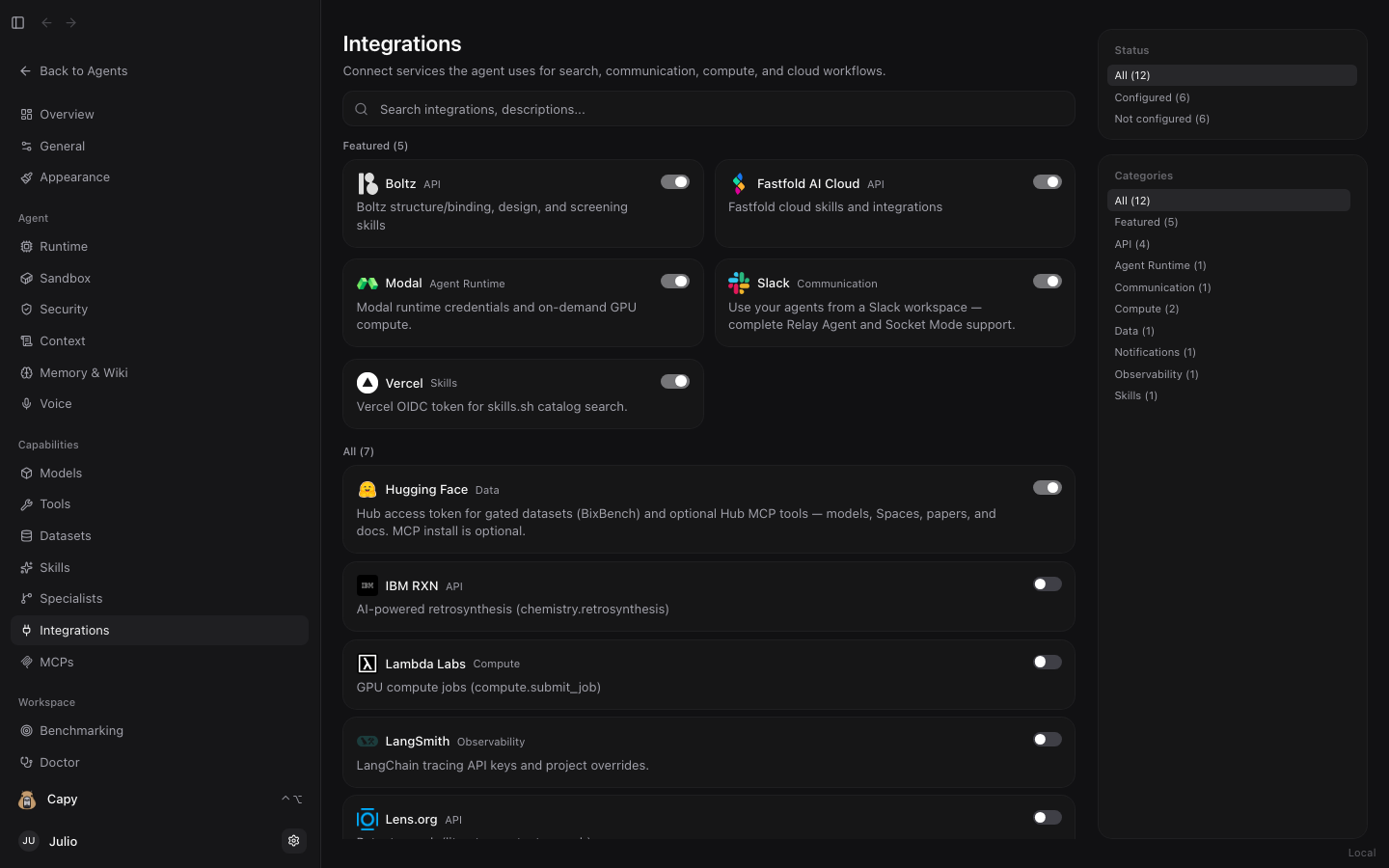
Dashboard → Integrations (/dashboard/integrations) connects external services, cloud compute providers, communication channels, and scientific APIs. Credentials are stored locally on your machine in ~/.sandwalk/config.json and automatically injected into matching tools, skills, and catalog MCP servers.
Featured Integrations

Run agent Python code and scientific pipelines on serverless CPU and GPU containers (T4, L4, A10, A100, H100) with automatic artifact sync.

Connect a Slack workspace with 1-click app manifest setup so teammates can chat with Sandwalk agents in channels or DMs.

Biomolecular structure prediction, pocket conditioning, binder design, and binding affinity scoring.

Managed cloud folding, BoltzGen binder design, and high-throughput molecular dynamics pipelines.

Search the public skills.sh leaderboard, inspect automated security audits, and install skills in one click.

Authenticate with HF_TOKEN to pull gated weights, biomedical datasets, and invoke Hugging Face MCP tools.

AI-driven chemical retrosynthesis, forward reaction prediction, and automated synthesis route planning.

Provision dedicated multi-GPU cloud instances for heavy model training, molecular dynamics, and batch screening.

Optional end-to-end trace logging, latency profiling, and token inspection for LangChain and Deep Agents runs.

Global patent landscape search, sequence-enabled patent claims, and scholarly citation graphs.
High-precision scientific web search, paper discovery, and full-text extraction for research agents.

Send automated completion alerts and HTML research digests when long-running campaigns finish.
How to Configure an Integration
- Open Dashboard → Integrations and filter by Status (
All,Configured,Not configured) or Category (Featured,API,Agent Runtime,Communication,Compute,Data,Observability,Skills). - Click any integration card to open its setup view.
- Paste your API key or token (or use the 1-click OAuth / manifest wizard for Slack and Fastfold AI Cloud), click Validate / Save, and toggle the integration On.
Last updated on