
Memory, Living Wiki & Omnigraph
Compounding local-first memory, Markdown Wiki, Omnigraph knowledge graphs, and 1-click Skill crystallization.
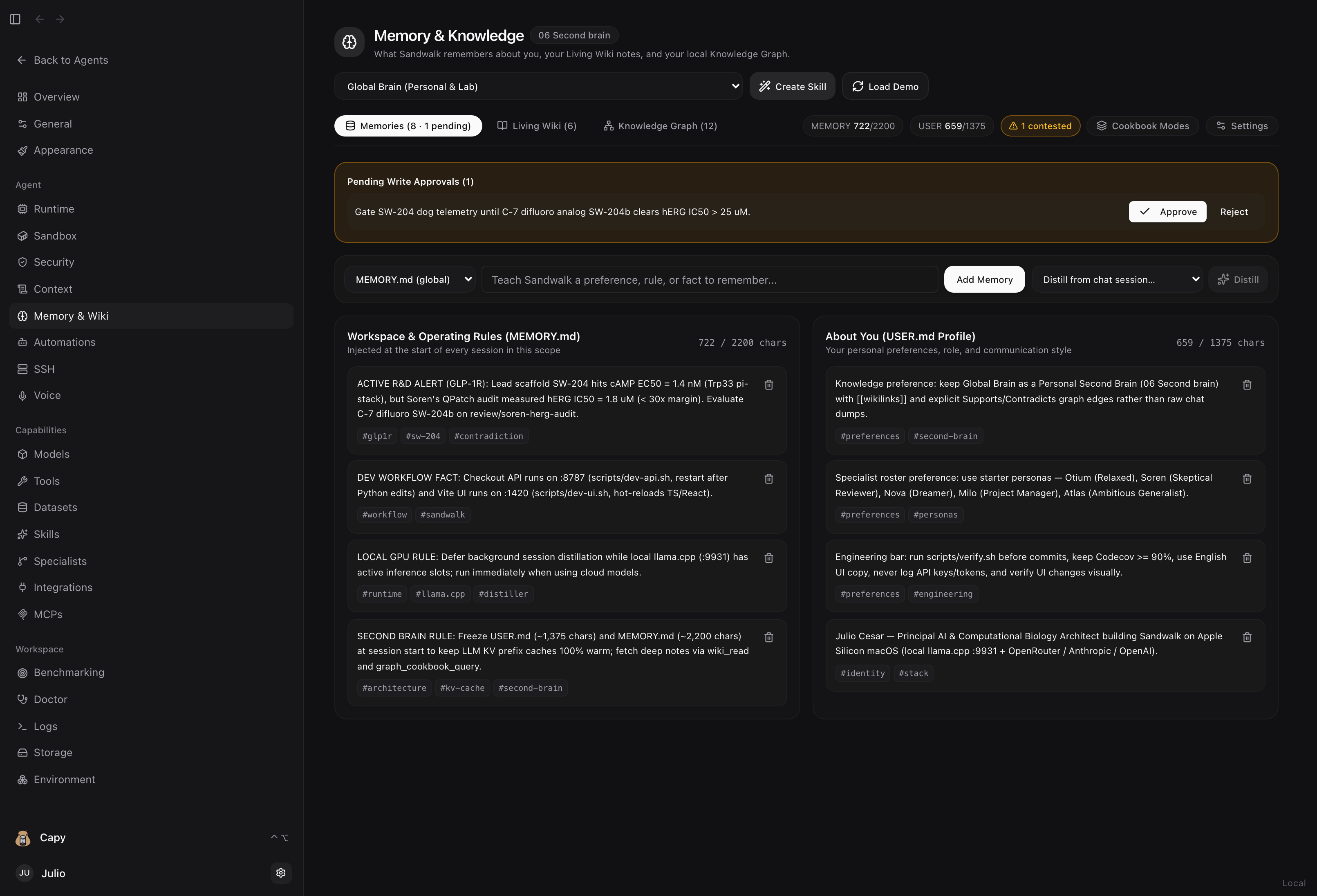
Sandwalk turns everyday sessions into a structured, self-improving local knowledge base under ~/.sandwalk/memory/—without requiring external database infrastructure or bloating your system prompt.
The Four Knowledge Assets
| Asset | On-Disk Location | Purpose |
|---|---|---|
1. Bounded Snapshots (USER.md, MEMORY.md, PRIORS.md) | ~/.sandwalk/memory/USER.md~/.sandwalk/memory/MEMORY.md~/.sandwalk/memory/specialists/<slug>/MEMORY.md | Compact, high-signal user preferences (~1,375 chars) and workspace/specialist rules (~2,200 chars) injected and frozen at session start so LLM KV prefix caches remain byte-stable. |
2. Living Markdown Wiki ([[wikilinks]]) | ~/.sandwalk/memory/wiki/<scope>/*.md | Multi-paragraph Markdown syntheses, target dossiers, and architecture notes with automatic [[wikilink]] and backlink indexing, live Preview / Split / Edit modes, and Full Screen editing. |
3. Local Omnigraph Knowledge Graph (.omni) | ~/.sandwalk/memory/omni/<scope>/graph.omnischema.pg · queries.gq · data.jsonl · SKILL.md | Versioned Rust + Lance graph engine (omnigraph.dev) with 6 runnable Cookbook Modes (01–06), Supports vs. Contradicts provenance edges, and Git-style review/* branches. |
4. Crystallized Skills (SKILL.md) | ~/.sandwalk/skills/<slug>/SKILL.mdreferences/{schema.pg,queries.gq,wiki-digest.md} | Verified domain rules, Living Wiki syntheses, and Omnigraph ontologies packaged into an executable /skill-slug that any agent or Specialist can invoke. |
1. Memories (MEMORY.md & USER.md)
When you open Dashboard → Memory & Wiki (/dashboard/memory), you land on the Memories tab:
- Scope Selector (Top Right): Switch between Global Brain (Personal & Lab), any Project Brain (
project:<id>), or any Specialist Brain (specialist:<id>). - Quick Add & Session Distiller Bar:
- Choose
MEMORY.md (<scope>)orUSER.md (About You), type a rule or preference, and click Add Memory. - Or pick any recent conversation from Distill from chat session… and click Distill to extract durable memories, a Living Wiki brief, and Knowledge Graph claims automatically.
- Choose
- Two-Column Split:
- Left (
MEMORY.md): Workspace and persona operating rules (2,200char budget). - Right (
USER.md): Personal profile, role, and communication preferences (1,375char budget).
- Left (
- Pending Write Approvals: When
write_approvalis enabled, agent-proposed memory additions appear in an amber banner at the top with one-click Approve and Reject actions.
2. Living Markdown Wiki (Preview / Split / Edit + Full Screen)
![Living Markdown Wiki in Split View with live preview, [[wikilinks]], Full Screen, and To Skill](/images/wiki.png)
- Real
.mdFiles on Disk: Stored under~/.sandwalk/memory/wiki/<scope>/(and<project>/.sandwalk/wiki/). - Interactive
[[wikilinks]]& Backlinks: Link pages with[[page-slug]]; clicking any[[wikilink]]in the live Markdown preview or backlink footer opens that page immediately. - Full-Screen Mode: Click Full Screen (or press
Escto exit) for a distraction-free, side-by-side Markdown editor and live preview. - One-Click
To Skill: Turn any Wiki page and its scope ontology into a reusable/skill-slugin one click.
3. Versioned Knowledge Graph & Cookbook Modes (01–06)
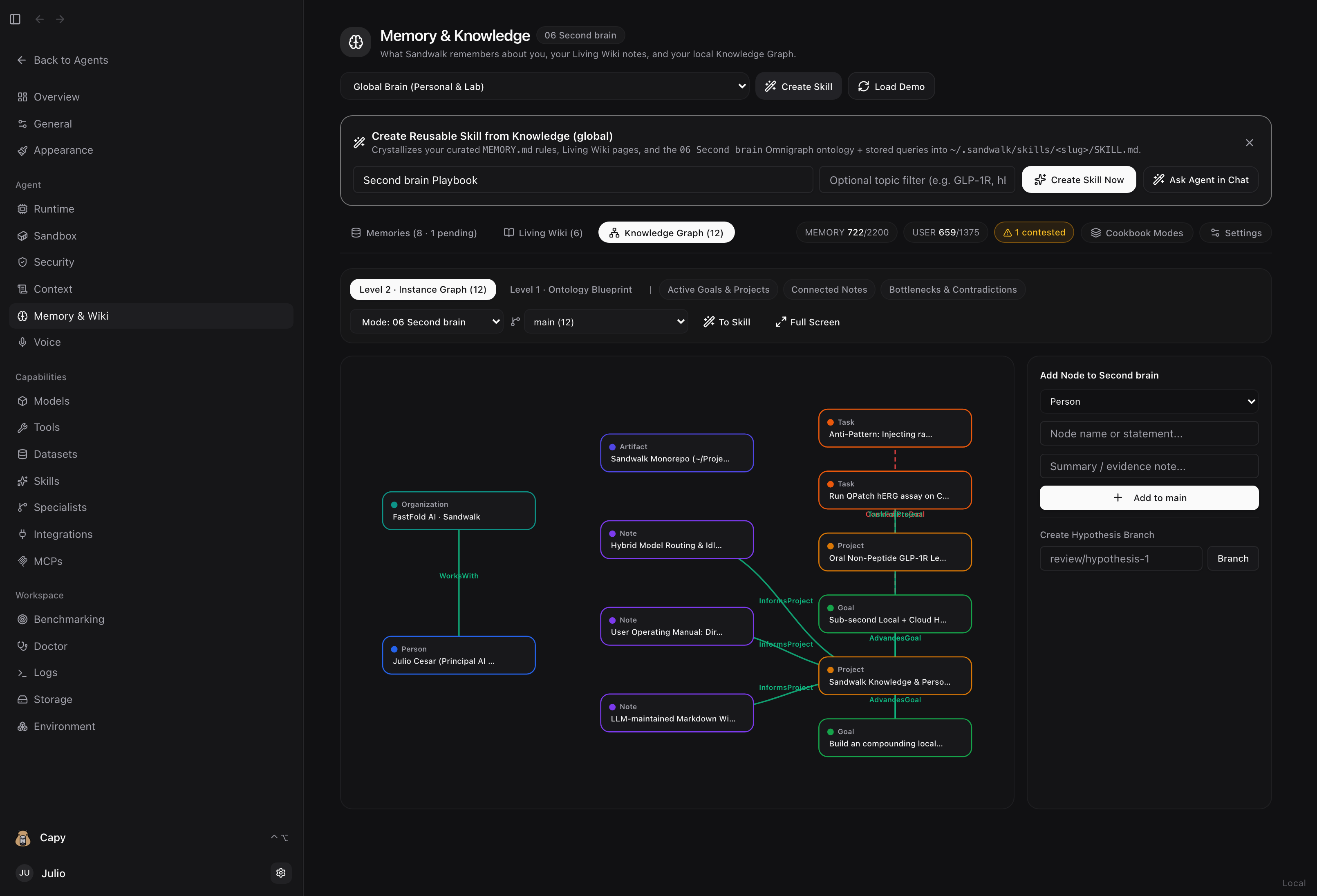
The Knowledge Graph tab opens directly on the interactive Level 2 · Instance Graph (with Level 1 · Ontology Blueprint available as a toggle to inspect .pg node layers and property definitions).
Six Runnable Cookbook Modes (Cookbook Modes Tab)
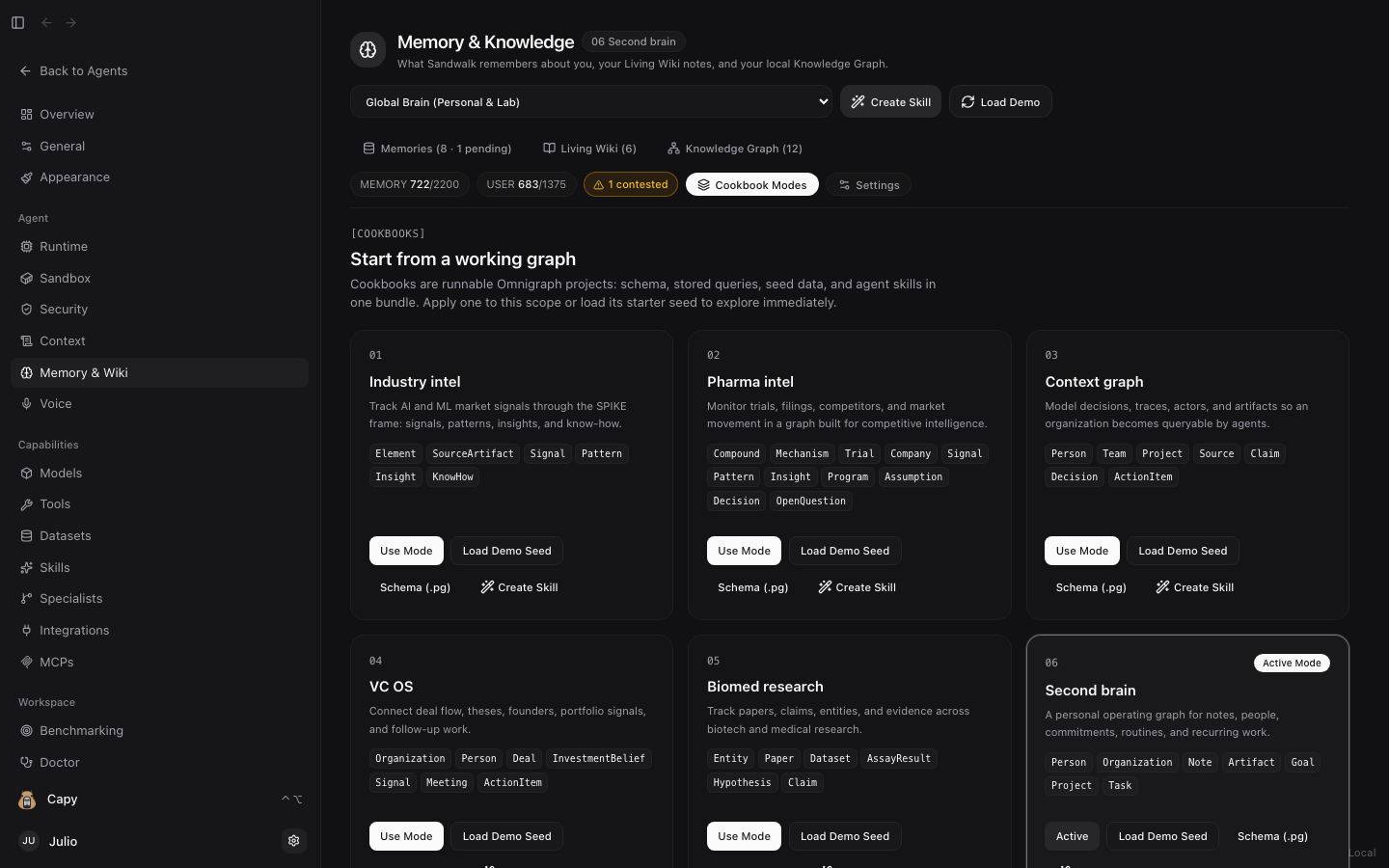
| Mode | Focus | Core Node Types |
|---|---|---|
01 Industry intel | Track AI/ML and market signals through the SPIKE framework | Element, SourceArtifact, Signal, Pattern, Insight, KnowHow |
02 Pharma intel | Monitor compounds, mechanisms, clinical trials, and thesis assumptions | Compound, Mechanism, Trial, Company, Signal, Pattern, Insight, Program, Assumption, Decision, OpenQuestion |
03 Context graph | Model organizational decisions, traces, actors, and action items | Actor, Artifact, Claim, Decision, ActionItem |
04 VC OS | Connect deal flow, investment beliefs, founders, and portfolio signals | Company, Founder, Deal, Signal, InvestmentBelief, FollowUp |
05 Biomed research | Track targets, papers, assays, hypotheses, and supporting/contradicting evidence | Entity, Paper, AssayResult, Hypothesis, Claim |
06 Second brain | Personal operating graph for people, notes, goals, projects, and tasks | Person, Organization, Note, Artifact, Goal, Project, Task |
4. Local Omnigraph Engine & Governance Settings (⚙️ Settings)
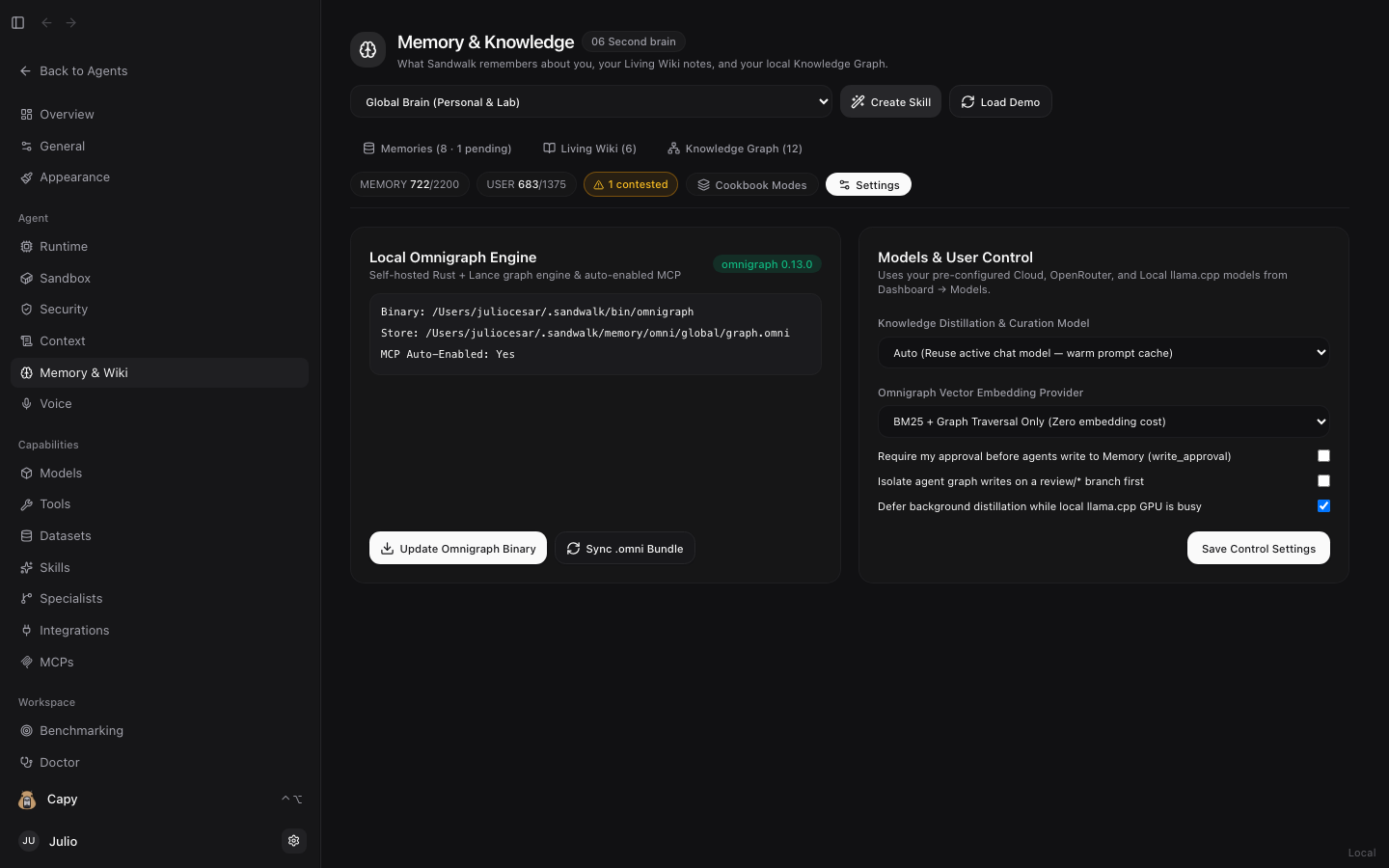
Click ⚙️ Settings in the Memory & Wiki tab bar to manage:
- 1-Click Local Omnigraph Engine (
v0.13.0): Installs~/.sandwalk/bin/omnigraph+omnigraph-server, generates the~/.sandwalk/bin/sandwalk-omnigraph-mcpstdio bridge, and syncsschema.pg,queries.gq,SKILL.md, anddata.jsonlintograph.omni. - Knowledge Distillation & Embedding Models: Choose
Auto(reuses the active chat model to keep prompt caches warm) or any configured Cloud, OpenRouter, or Localllama.cppmodel, and configure governance toggles (write_approval,graph_branch_on_write,defer_on_local_gpu).
Last updated on