
SSH & Remote Servers
Connect to Linux, macOS, and GPU servers over SSH with automatic user-space installation and 24/7 background daemons.
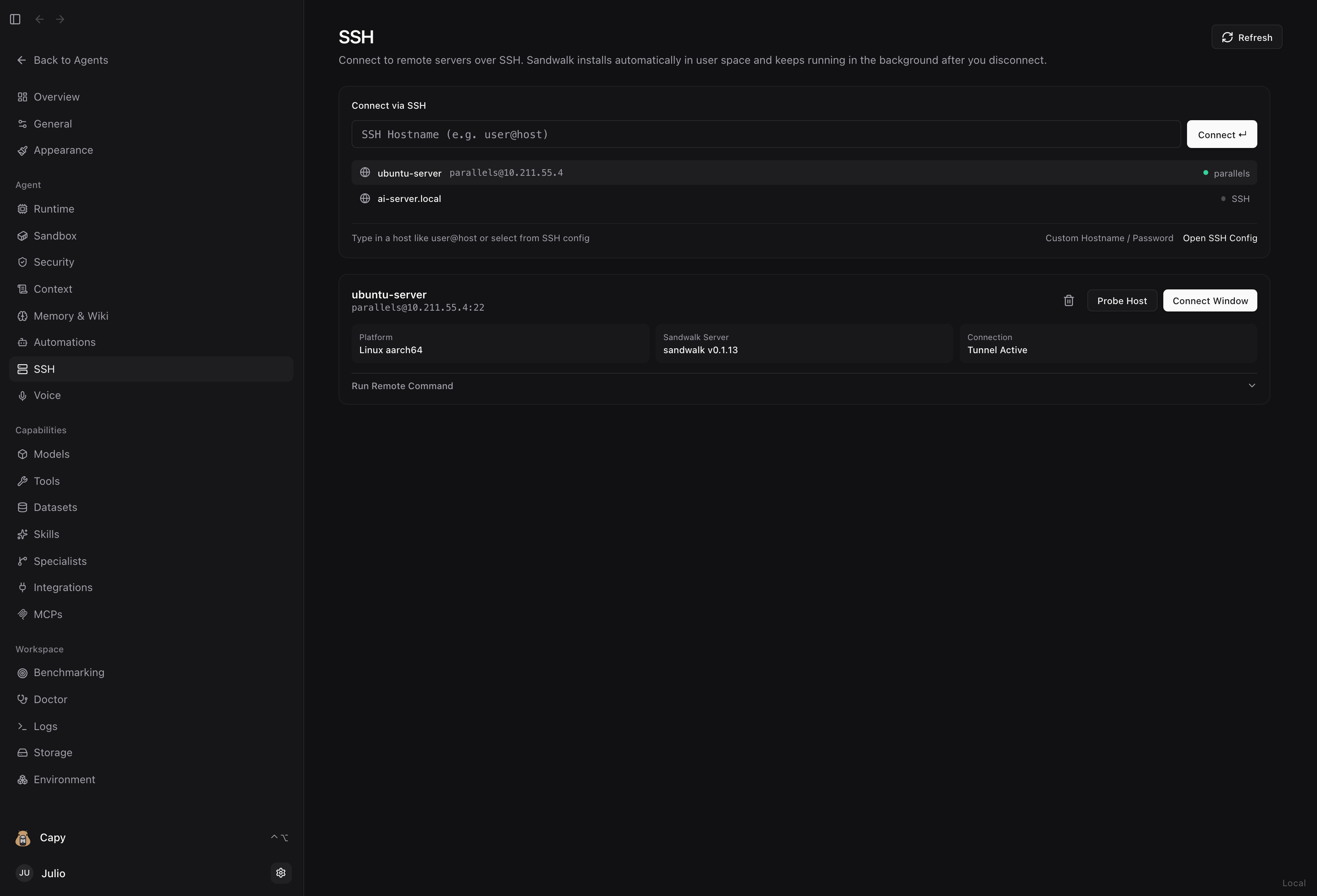
Sandwalk includes built-in SSH management (Dashboard → SSH, New Window (Remote) → Remote-SSH, and sandwalk ssh) so you can connect to remote Linux workstations, cloud VMs, and shared university/HPC servers—even when Sandwalk is not installed on the target machine yet.
1-Click Auto-Install & Persistent Remote Daemon
When you click Connect Window (or run sandwalk ssh connect <user@host>), Sandwalk performs four steps over your existing SSH key/agent credentials:
- Probe & Password-to-Key Setup: Connects to
user@host(or any host from~/.ssh/config). If the server requires a password on first login, Sandwalk prompts for your password, authenticates viaSSH_ASKPASS, and installs your local SSH public key into~/.ssh/authorized_keysso all future connections and automations work passwordlessly. - Custom Hostname &
~/.ssh/configEditor: Assign a friendly alias (e.g.ubuntu-server) and edit~/.ssh/configdirectly inside the SSH view. - User-Space Auto-Install: If
sandwalkis not installed on the remote machine, Sandwalk automatically installs the CLI into~/.local/bin/sandwalk—requiring nosudoor root access. - Persistent 24/7 Background Server: Starts
sandwalk serveon the remote host usingsystemd --user(sandwalk.servicewithRestart=always) or a detachedsetsid nohupdaemon plus acrontabwatchdog. When you close your laptop or disconnect SSH, the remote server and all of its Automations keep running. - Local SSH Port-Forward Tunnel: Opens a secure local tunnel (
127.0.0.1:<port> → remote:8787) so the remote server only needs SSH port22open.
Agent & CLI SSH Tools (sandwalk ssh & /ssh)
Both your chat agents and Capy can manage SSH hosts, run remote commands, and sync workspace files using the built-in /ssh and /tao-run-on-slurm skills:
# List saved and ~/.ssh/config discovered hosts
sandwalk ssh list

# Register and probe a remote server
sandwalk ssh add user@remote-server --alias dev-server --workdir ~/workspace
sandwalk ssh probe dev-server

# Auto-install Sandwalk remotely, start the 24/7 daemon, and open an SSH tunnel
sandwalk ssh connect dev-server

# Run a command on the remote server
sandwalk ssh exec dev-server "uptime && df -h ."
Last updated on